Visualization
graphfinder.viz turns a SearchResult into figures and animations with
matplotlib. Every helper takes the result of a search run with record=True
(needed for the per-step trace) and returns a matplotlib object you can further
style or save.
All functions import matplotlib lazily, so importing the package stays cheap.
animate_grid — watch the search explore
The flagship. Replays each expanded cell, then draws the path.
r = gf.search(maze, algorithm="astar", record=True)
anim = gf.viz.animate_grid(maze, r, interval=40)
anim.save("astar.gif", writer="pillow", fps=25)     # or HTML(anim.to_jshtml()) in a notebook
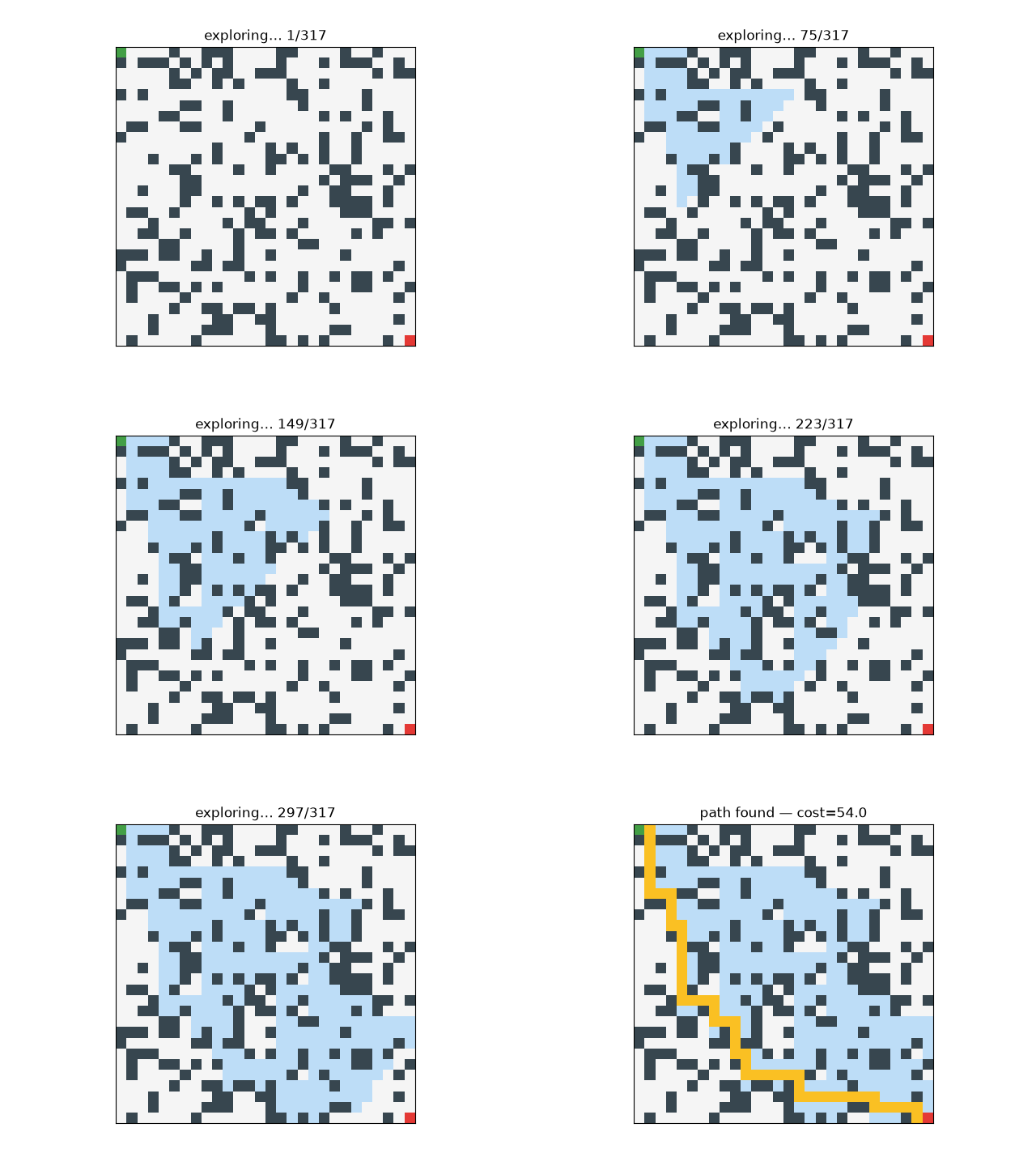
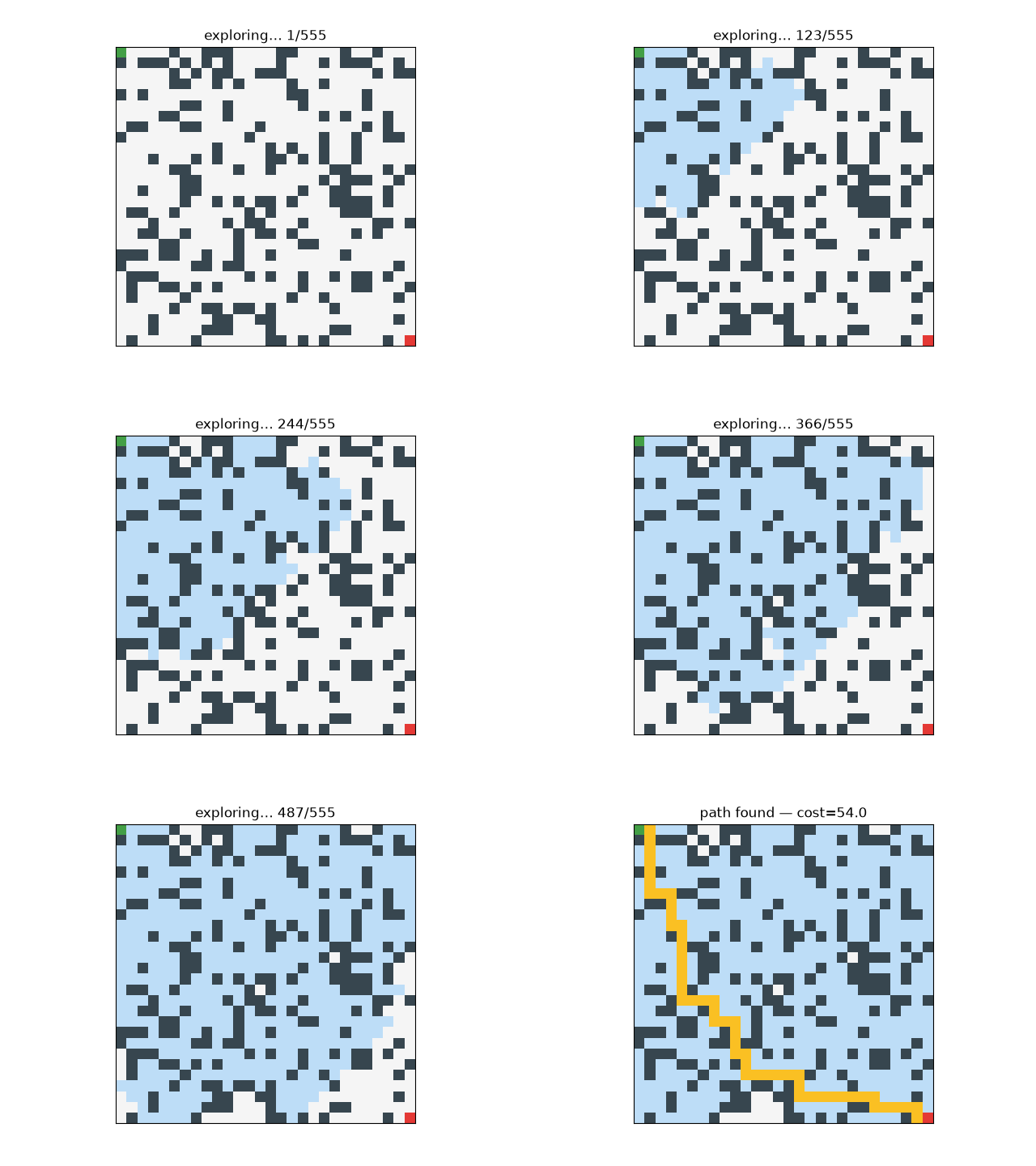
Same maze, two strategies: A* (left) drives toward the goal; BFS (right) floods outward in rings. The contrast is the whole point of informed search.
plot_grid — static snapshot
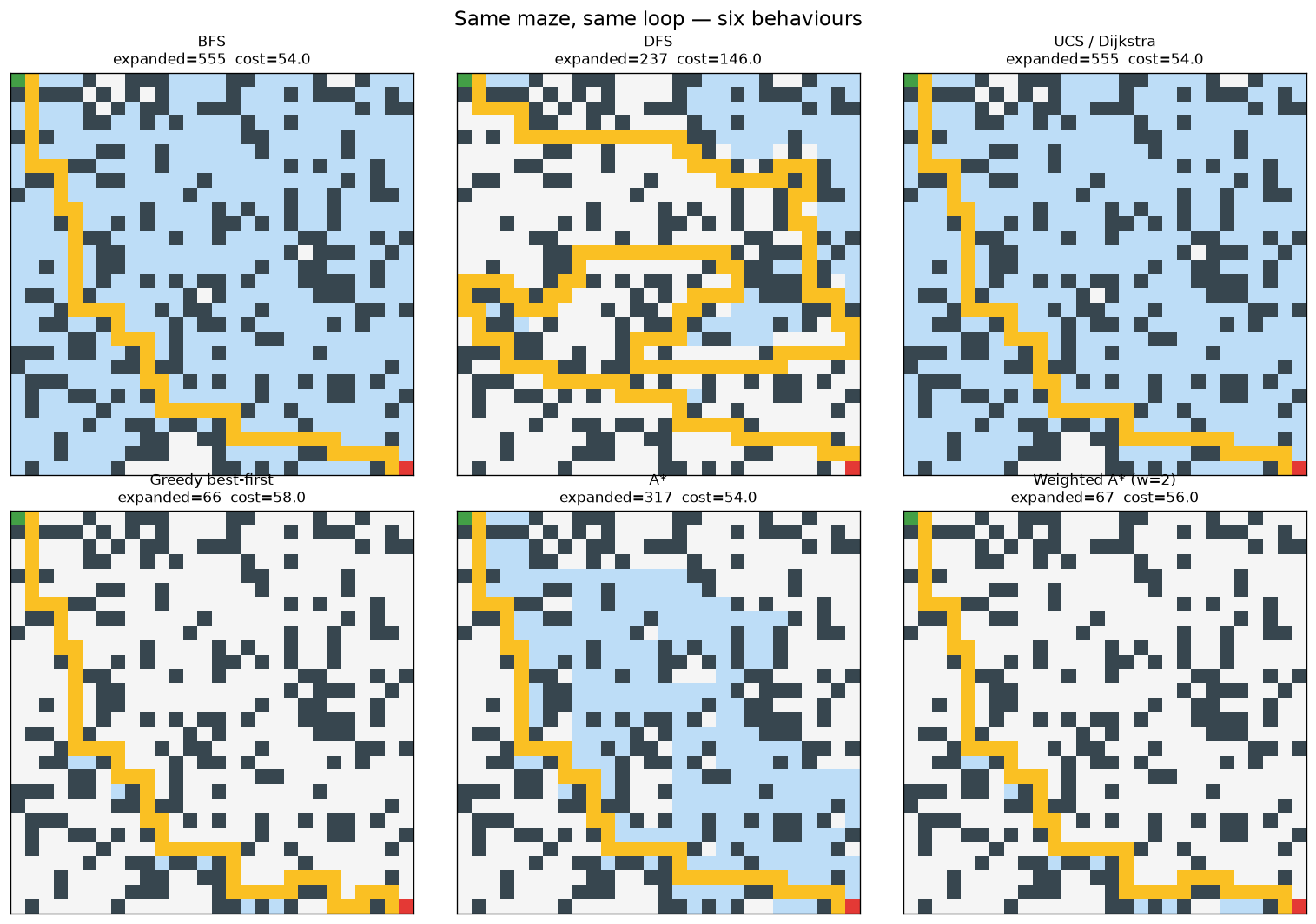
A single frame: walls, every expanded cell shaded, the path on top.
Stack several to compare algorithms at a glance:
plot_costs — terrain heatmap
For weighted grids, plot_costs shows the terrain
as a heatmap (walls left blank). plot_grid/animate_grid also shade the
terrain underneath the search, so you can see what was explored over what
terrain.
terrain = [[1.0]*24 for _ in range(24)]
for r in range(4, 20):
    for c in range(9, 15):
        terrain[r][c] = 9.0                      # an expensive plateau

r = gf.search_grid_costs(terrain, (0, 0), (23, 23), algorithm="astar", record=True)
gf.viz.plot_costs(terrain)                       # the heatmap
gf.viz.plot_grid(terrain, r)                     # A* skirting the costly region
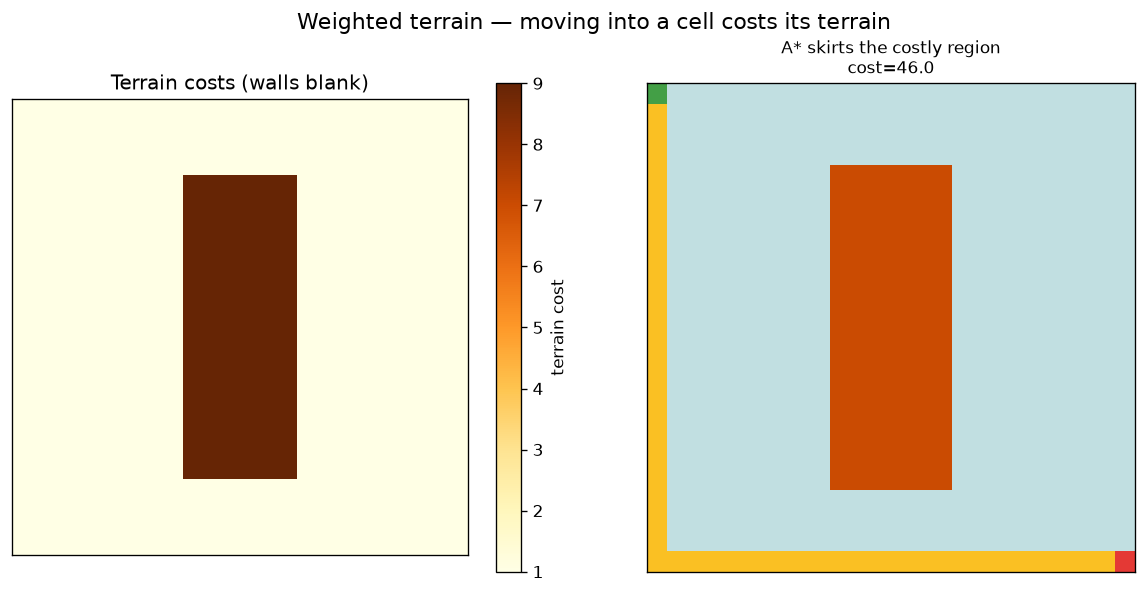
Grid viz accepts either an ASCII map (digits 1–9 are costs) or the cost
matrix you passed to search_grid_costs.
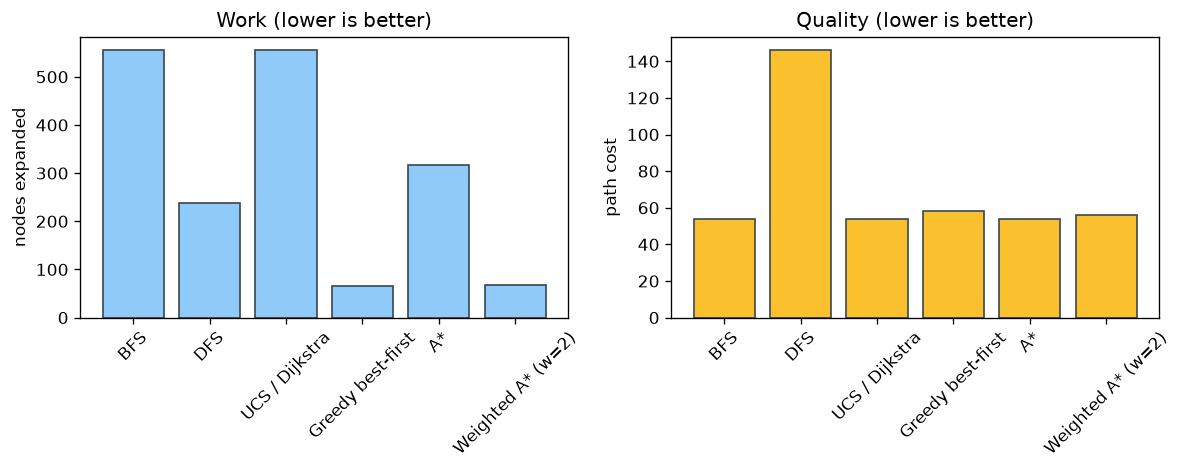
compare — work vs quality
Pass a dict {name: result}; get bar charts of nodes expanded (work) and path
cost (quality).
results = {
    "BFS":    gf.search(maze, algorithm="bfs",    heuristic="zero"),
    "UCS":    gf.search(maze, algorithm="ucs",    heuristic="zero"),
    "Greedy": gf.search(maze, algorithm="greedy", heuristic="manhattan"),
    "A*":     gf.search(maze, algorithm="astar",  heuristic="manhattan"),
}
gf.viz.compare(results)
plot_frontier — the memory profile
Frontier size at each expansion step — the graph-search analogue of a convergence curve. Overlay several algorithms on one axis:
ax = None
for algo, h in [("bfs","zero"), ("ucs","zero"), ("astar","manhattan")]:
    r = gf.search(maze, algorithm=algo, heuristic=h, record=True)
    ax = gf.viz.plot_frontier(r, ax=ax, label=algo)
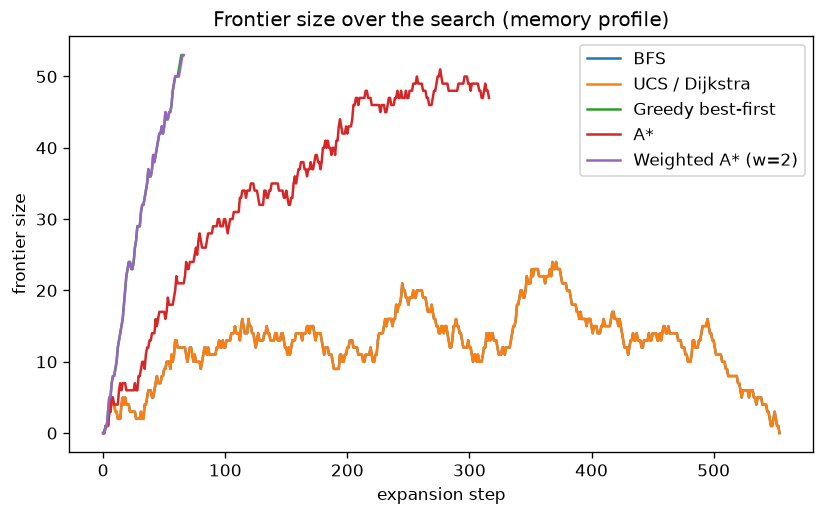
The flood algorithms grow a large frontier; informed ones keep it small.
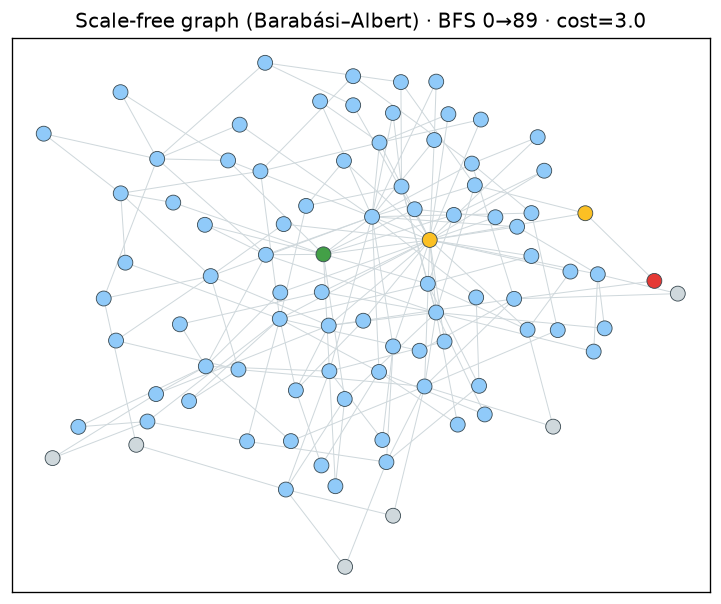
plot_graph — general graphs
Lay out an explicit graph and colour nodes by their role in the search (grey =
untouched, blue = expanded, gold = path, green/red = start/goal). Uses a
networkx spring layout if installed, else a circular layout.
edges = gf.gen_barabasi_albert(90, 2, seed=3)
r = gf.search_graph(90, edges, 0, 89, algorithm="bfs", record=True)
gf.viz.plot_graph(90, edges, r)
plot_search_tree — the tree the search built
Where plot_grid shows where the search went, plot_search_tree shows how:
the tree of best-parent links discovered while exploring, rooted at the start,
with the solution path picked out in gold. It works for any domain — grids,
graphs and puzzles — because the core records the parent map for you.
r = gf.search(gf.random_maze_ascii(7, 7, 0.2, 5),
              algorithm="astar", heuristic="manhattan", record=True)
gf.viz.plot_search_tree(r)
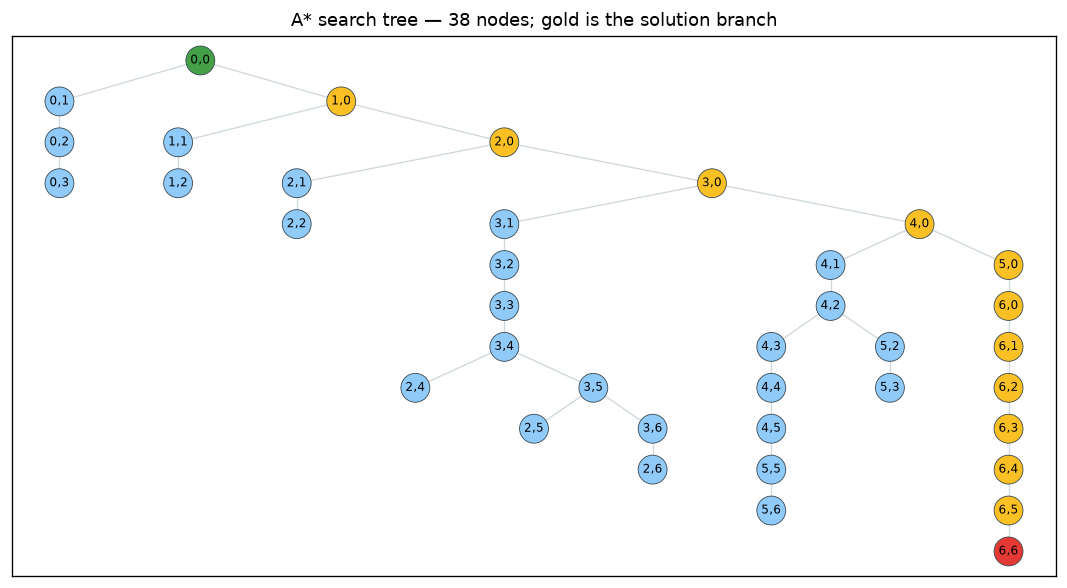
It needs result.tree, recorded with record=True (the default). That field is
empty for the iterative-deepening and bidirectional algorithms (iddfs,
ida_star, bidirectional), which keep no persistent parent map — use a main
algorithm (bfs, dfs, ucs, greedy, astar, weighted_astar). Labels are
shown automatically for small trees; pass with_labels=False for big ones.
Reproduce these figures
Every image on this site is produced by one script:
See the API reference for each function's full signature.